
CASE STUDY
CASE STUDY
Reclaiming the Screen: How We Fixed Our Navigation
Reclaiming the Screen: How We Fixed Our Navigation
Reclaiming the Screen: How We Fixed Our Navigation
Reclaiming horizontal real estate to give users back 90% of their workspace.
Reclaiming horizontal real estate to give users back 90% of their workspace.
Reclaiming horizontal real estate to give users back 90% of their workspace.

Role:
Role:
Product Designer
Product Designer
|
Scope:
Scope:
UI/UX Redesign, Interaction Design, System Architecture
UI/UX Redesign, Interaction Design, System Architecture
|
In collaboration with:
In collaboration with:
Founder & Lead Developer
Founder & Lead Developer
01 | Context & Business Overview
01 | Context & Business Overview
EC OneX is a digital ecosystem built to help Indian MSMEs and manufacturers grow. Unlike a complex, bloated CRM, we offer a lightweight Lead Management workflow that allows small teams to handle an enquiry’s entire lifecycle in one place.
EC OneX is a digital ecosystem built to help Indian MSMEs and manufacturers grow. Unlike a complex, bloated CRM, we offer a lightweight Lead Management workflow that allows small teams to handle an enquiry’s entire lifecycle in one place.
Heavy duty b2B SaaS
Heavy duty b2B SaaS
Engineer’s Cradle built OneX to make complex business management easier for small teams handling the complete lifecycle from enquiry to order.
Engineer’s Cradle built OneX to make complex business management easier for small teams handling the complete lifecycle from enquiry to order.
Efficiency Driven Operators
Efficiency Driven Operators
Sales Managers, Business Owners, and Coordinators use the platform as their primary daily tool.
Sales Managers, Business Owners, and Coordinators use the platform as their primary daily tool.
High Utility Workspace
High Utility Workspace
Success here is defined by data visibility and workflow speed. The interface must act as a transparent tool, not a distraction.
Success here is defined by data visibility and workflow speed. The interface must act as a transparent tool, not a distraction.
02 | The Problem
02 | The Problem
At Engineer’s Cradle, our dashboard was feeling claustrophobic. In a data-dense B2B product, horizontal space is the most valuable asset. We realized our legacy design was struggling with serious layout inefficiency—where the navigation was crowding out the actual work. Since the product was already live and fully developed, we also faced significant technical constraints; we had limited freedom in how we could move or reposition internal elements, as we needed to avoid a major code revamp.
At Engineer’s Cradle, our dashboard was feeling claustrophobic. In a data-dense B2B product, horizontal space is the most valuable asset. We realized our legacy design was struggling with serious layout inefficiency—where the navigation was crowding out the actual work. Since the product was already live and fully developed, we also faced significant technical constraints; we had limited freedom in how we could move or reposition internal elements, as we needed to avoid a major code revamp.
At Engineer’s Cradle, our dashboard was feeling claustrophobic. In a data-dense B2B product, horizontal space is the most valuable asset. We realized our legacy design was struggling with serious layout inefficiency—where the navigation was crowding out the actual work. Since the product was already live and fully developed, we also faced significant technical constraints; we had limited freedom in how we could move or reposition internal elements, as we needed to avoid a major code revamp.
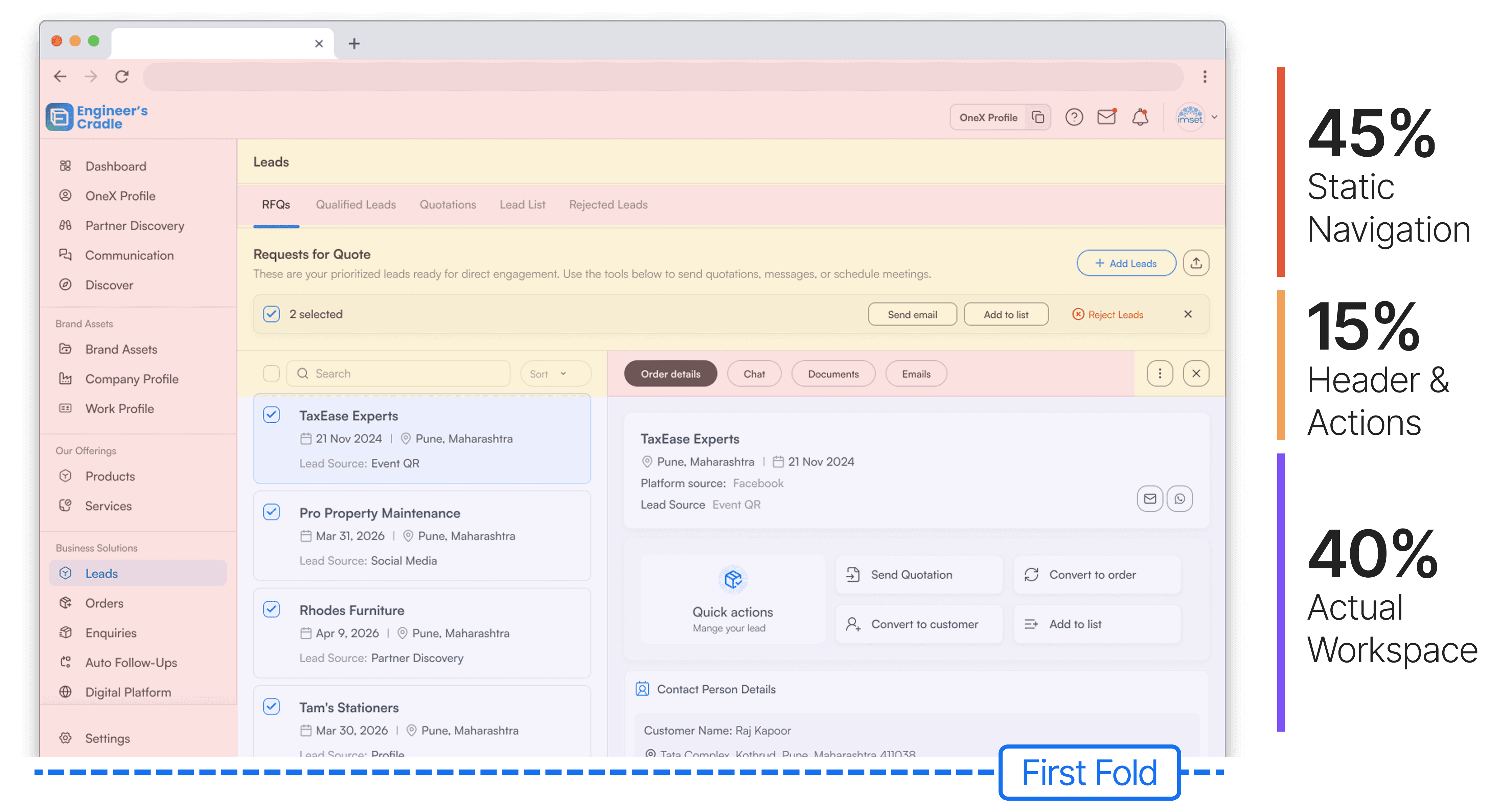
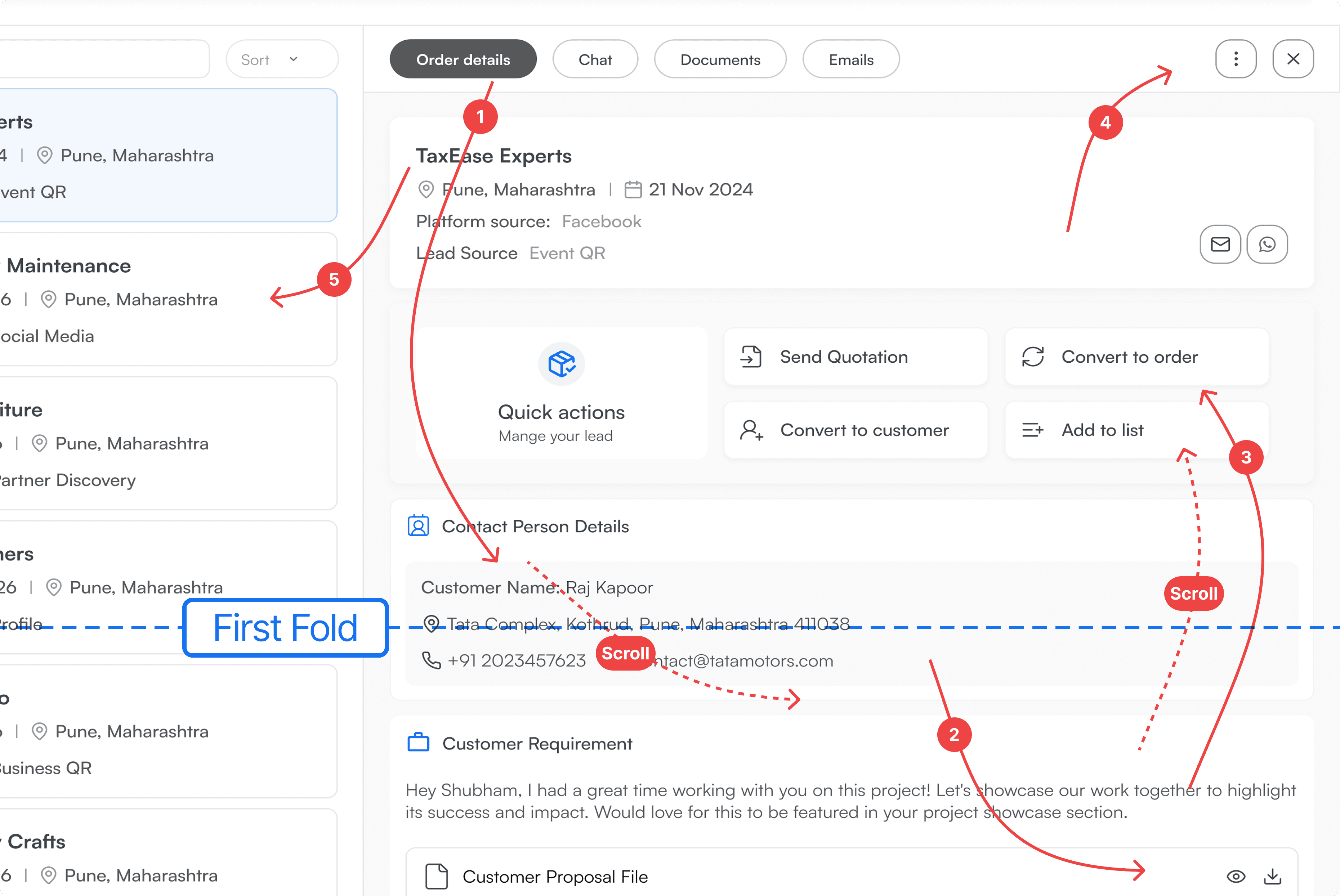
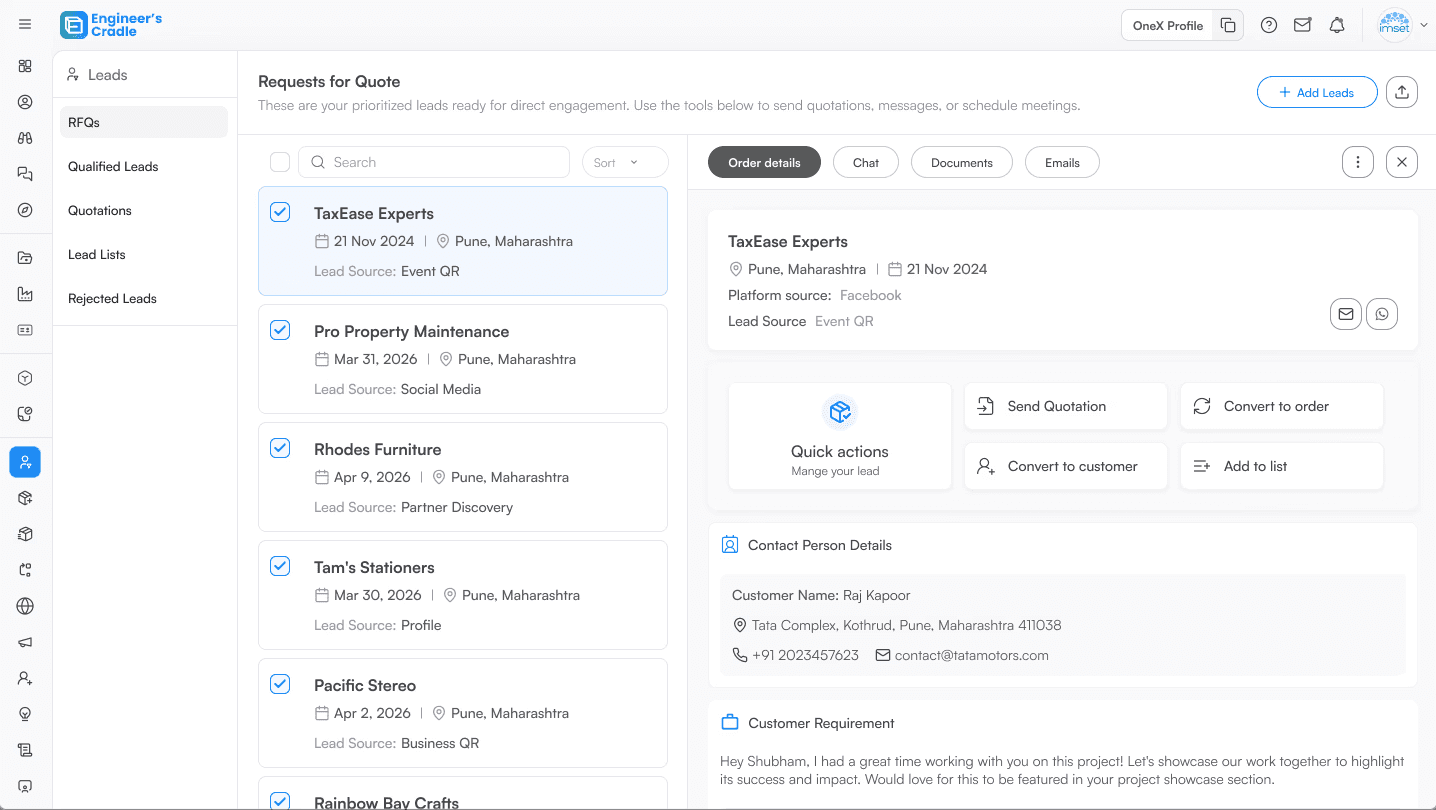
Because the workspace was so squished, critical fields like Quick Action buttons and, in this case, Contact Person Details were pushed away from the first fold. Users were trapped in a cycle of constant scrolling just to perform basic tasks like sending a quotation.
Because the workspace was so squished, critical fields like Quick Action buttons and, in this case, Contact Person Details were pushed away from the first fold. Users were trapped in a cycle of constant scrolling just to perform basic tasks like sending a quotation.
03 | The Solution: Flipping the ratio
03 | The Solution: Flipping the ratio
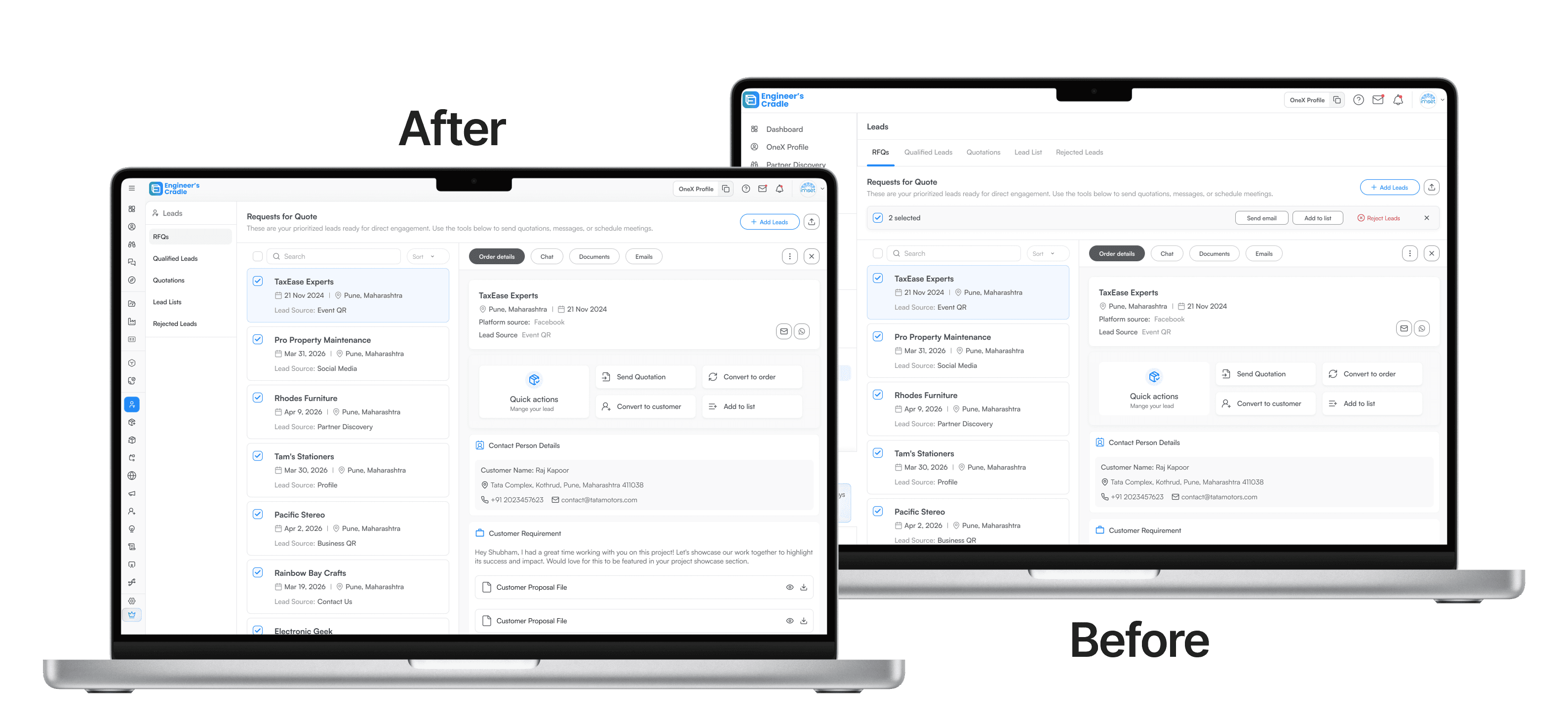
Our primary goal was to flip the ratio: shrinking the UI controls to amplify the content i.e. the user’s data. We aimed to move from a 40% viewing area to a 90% optimized workspace by prioritizing Information Density without sacrificing discoverability.
Our primary goal was to flip the ratio: shrinking the UI controls to amplify the content i.e. the user’s data. We aimed to move from a 40% viewing area to a 90% optimized workspace by prioritizing Information Density without sacrificing discoverability.
The 54px Slim-rail & the reclaimed space
The 54px Slim-rail & the reclaimed space
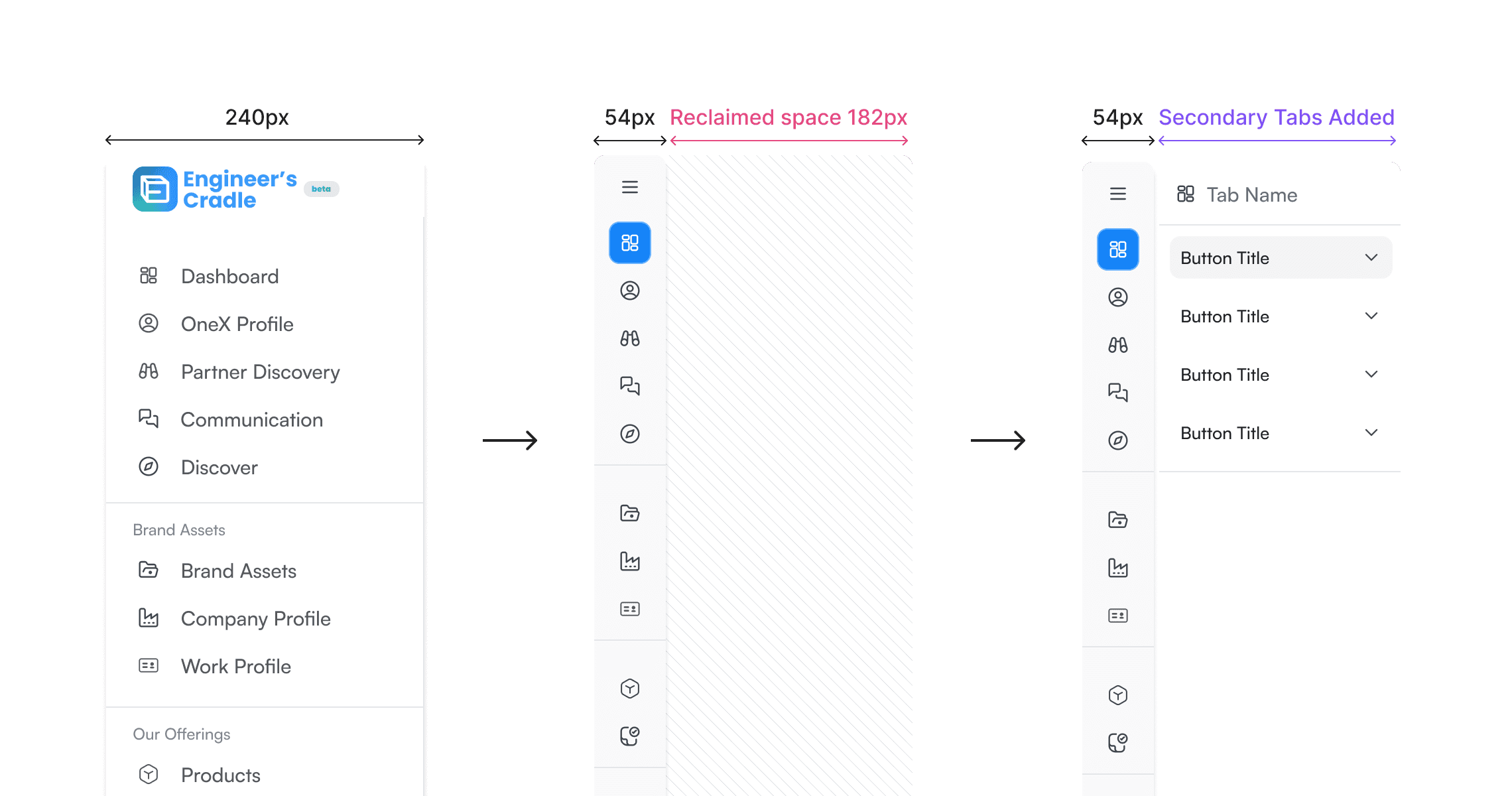
We reduced the navigation width from 240px sidebar down to a 54px icon-only rail. This single move reclaimed 182px of horizontal screen real estate instantly. By shifting the secondary navigation—which was originally placed horizontally—to the now available vertical sidebar area, we were able to reclaim that horizontal space without majorly disturbing the existing coded components.
We reduced the navigation width from 240px sidebar down to a 54px icon-only rail. This single move reclaimed 182px of horizontal screen real estate instantly. By shifting the secondary navigation—which was originally placed horizontally—to the now available vertical sidebar area, we were able to reclaim that horizontal space without majorly disturbing the existing coded components.
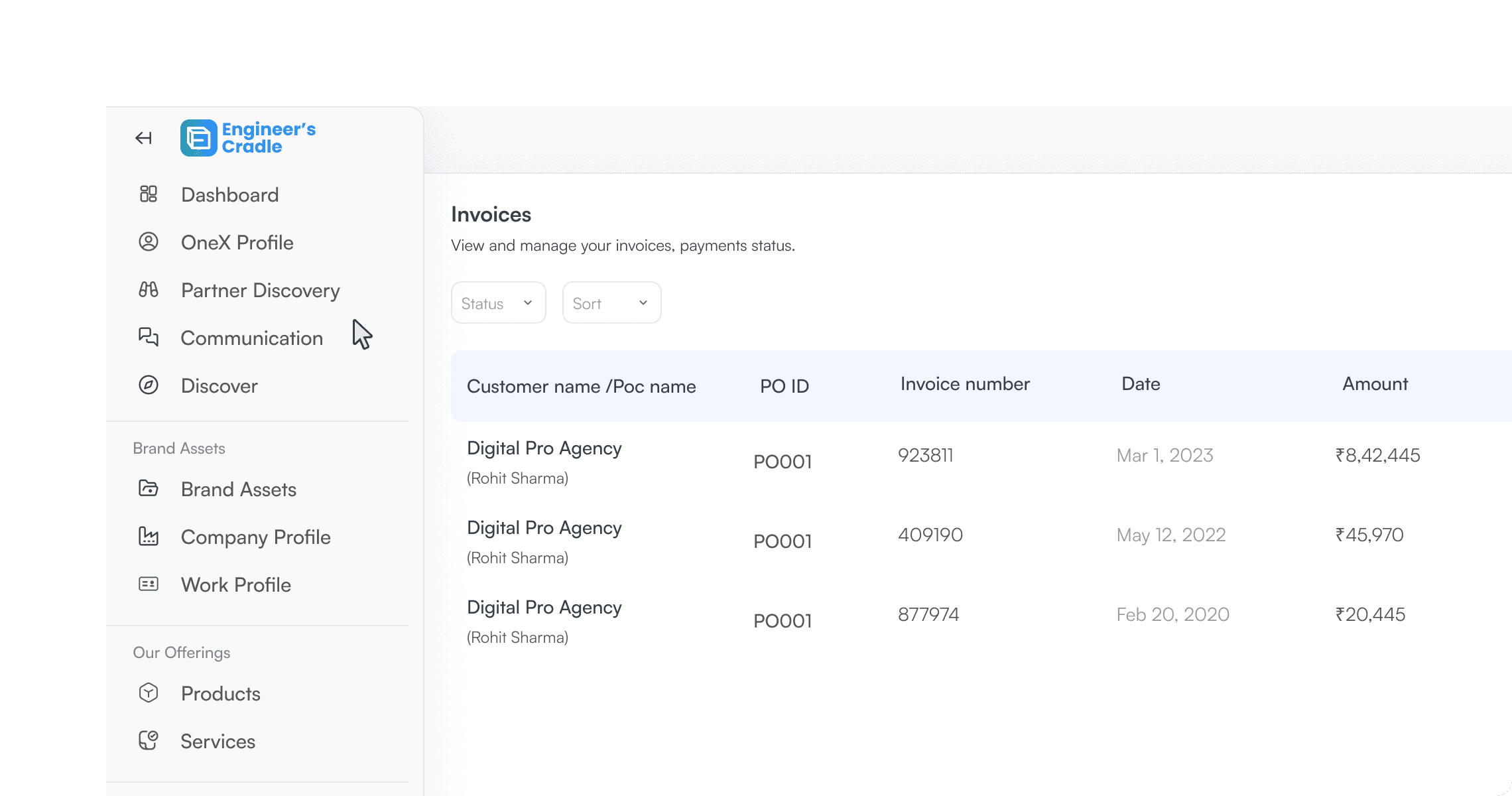
Hover-to-Expand Logic
Hover-to-Expand Logic
The sidebar locks in place during interaction, maintaining discoverability for new users without penalizing power users.
A persistent button also allows users to pin the navbar open on non-desktop devices— ensuring the pattern works regardless of input methods or user preference.
The sidebar locks in place during interaction, maintaining discoverability for new users without penalizing power users.
A persistent button also allows users to pin the navbar open on non-desktop devices— ensuring the pattern works regardless of input methods or user preference.
First-Fold Optimization
First-Fold Optimization
By expanding the Order Details pane into the newly reclaimed space, scrolling was eliminated for 80% of top-level lead tasks. Key triggers—like Send Quotation and Convert to Order—are now instantly accessible. Interaction cost is minimized.
By expanding the Order Details pane into the newly reclaimed space, scrolling was eliminated for 80% of top-level lead tasks. Key triggers—like Send Quotation and Convert to Order—are now instantly accessible. Interaction cost is minimized.
04 | Impact & final thoughts
04 | Impact & final thoughts
EC OneX is a digital ecosystem built to help Indian MSMEs and manufacturers grow. Unlike a complex, bloated CRM, we offer a lightweight Lead Management workflow that allows small teams to handle an enquiry’s entire lifecycle in one place.
EC OneX is a digital ecosystem built to help Indian MSMEs and manufacturers grow. Unlike a complex, bloated CRM, we offer a lightweight Lead Management workflow that allows small teams to handle an enquiry’s entire lifecycle in one place.
EC OneX is a digital ecosystem built to help Indian MSMEs and manufacturers grow. Unlike a complex, bloated CRM, we offer a lightweight Lead Management workflow that allows small teams to handle an enquiry’s entire lifecycle in one place.
90%
90%
Data-Centric Workspace.
Data-Centric Workspace.
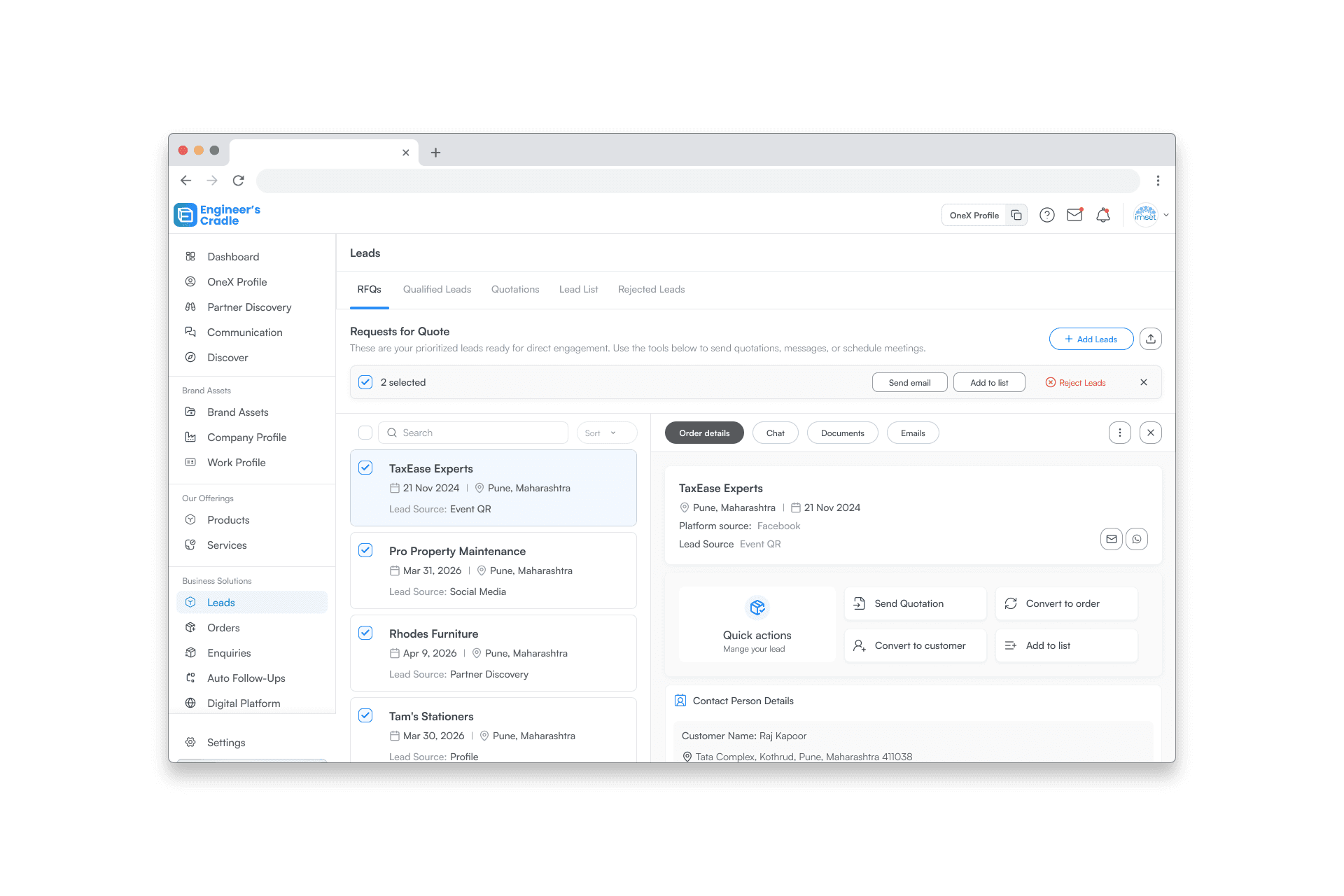
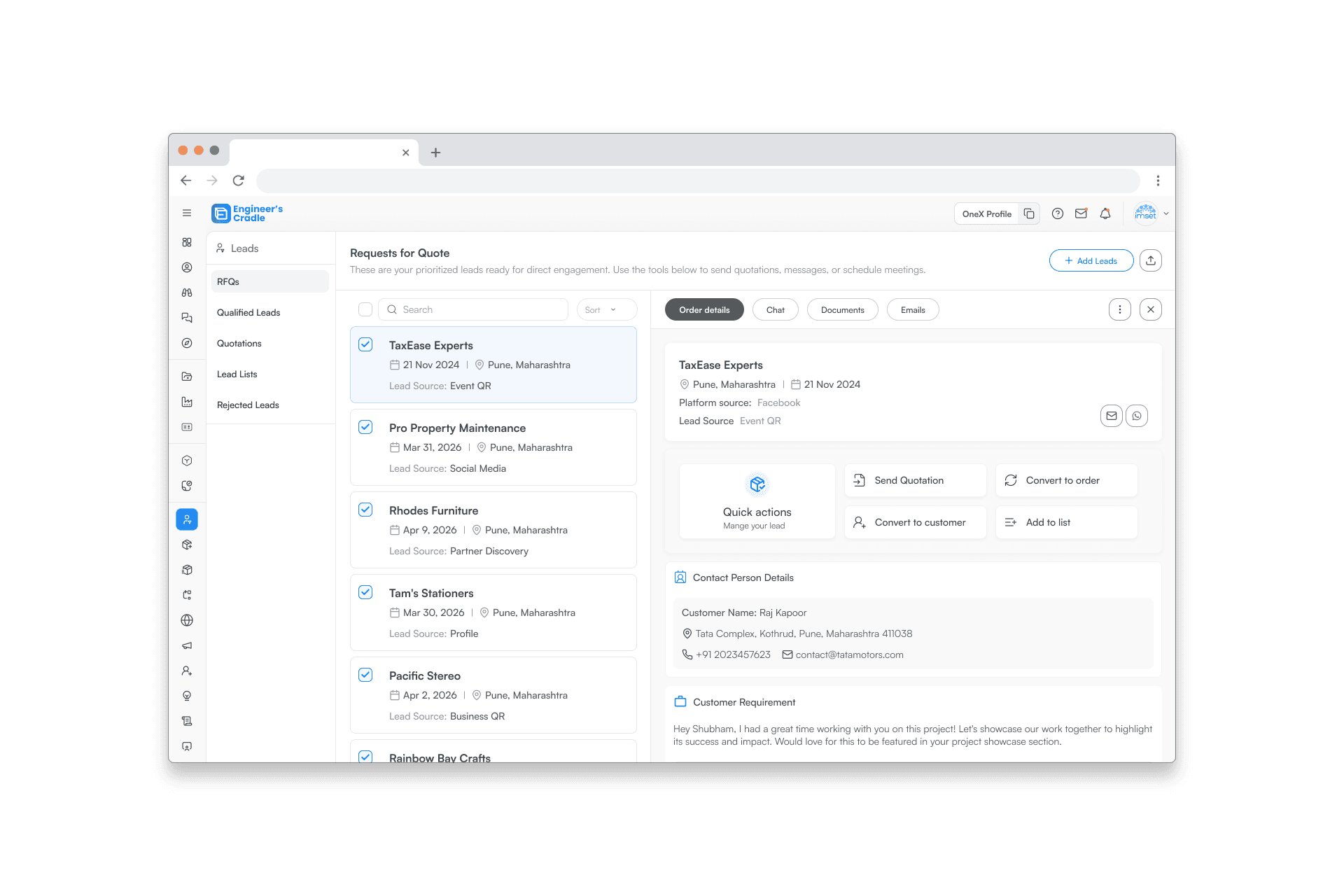
Successfully shifted from a 50% UI-choked viewing area to a 90% optimized workspace.
We measured the pixel ratio of nav to content area before and after— the content area nearly doubled.
We measured the pixel ratio of nav to content area before and after— the content area nearly doubled.
zero
zero
Scroll Interaction Cost.
Scroll Interaction Cost.
We mapped the top 5 daily tasks against the first fold and confirmed that the most frequent tasks no longer required any scrolling.
10+
10+
Future-Proof Scalability.
Future-Proof Scalability.
The vertical rail architecture gives us room to scale without hitting the layout constraints we faced with the original horizontal navigation.
The vertical rail architecture gives us room to scale without hitting the layout constraints we faced with the original horizontal navigation.
INTERACTIVE: BEFORE & AFTER SLIDER > Drag the slider to visualize the transformation from a crowded 240px sidebar to a lean, high-efficiency workspace.
INTERACTIVE: BEFORE & AFTER SLIDER > Drag the slider to visualize the transformation from a crowded 240px sidebar to a lean, high-efficiency workspace.
INTERACTIVE: BEFORE & AFTER SLIDER > Drag the slider to visualize the transformation from a crowded 240px sidebar to a lean, high-efficiency workspace.

Other Projects
Other Projects
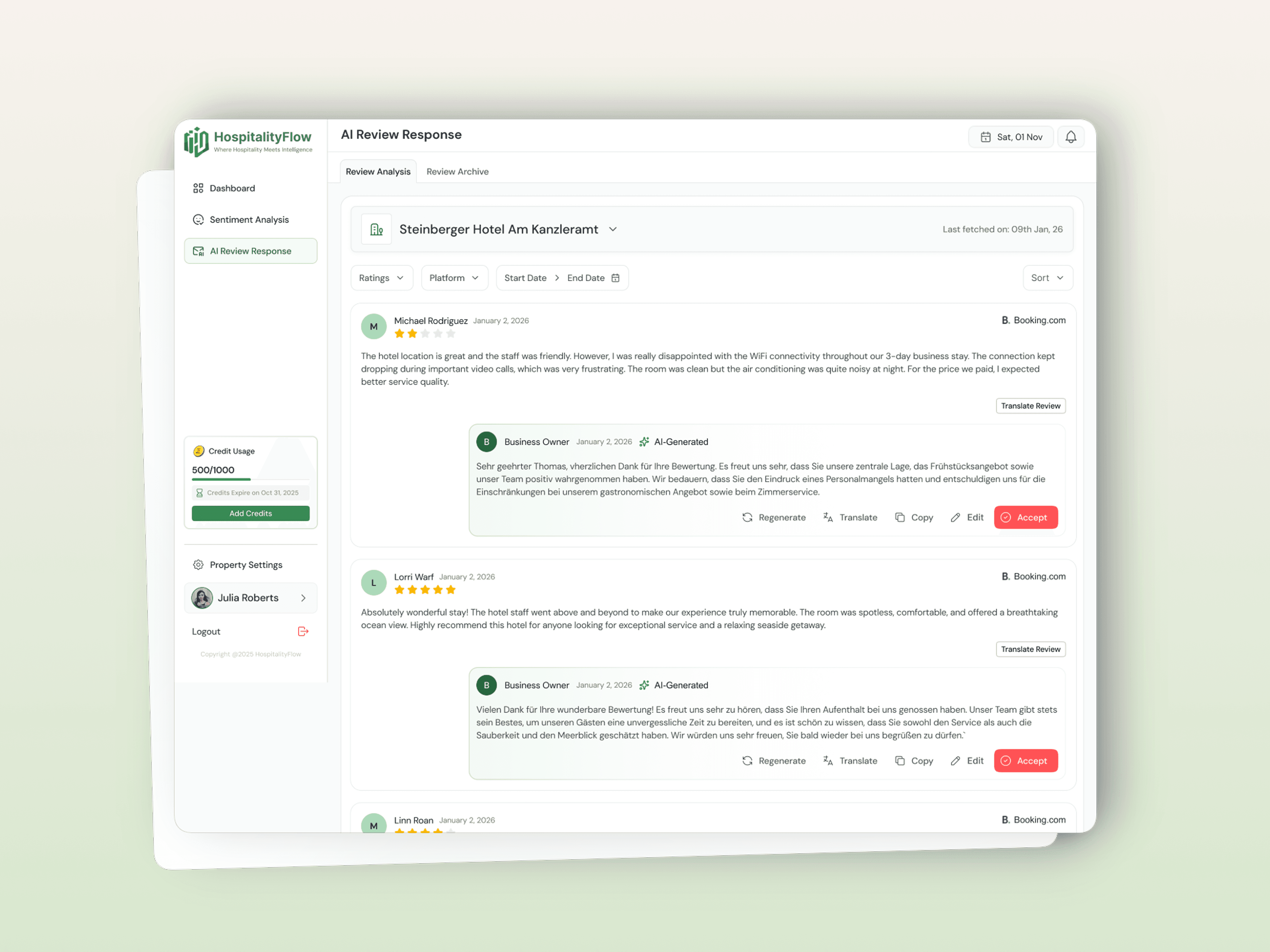
01 | HospitalityFlow - AI Hospitality Management
Designed dashboard interface and landing page for an AI-powered platform that helps hotel teams automate review responses and track guest sentiment across properties.
01 | HospitalityFlow - AI Hospitality Management
Designed dashboard interface and landing page for an AI-powered platform that helps hotel teams automate review responses and track guest sentiment across properties.
01 | HospitalityFlow - AI Hospitality Management
Designed dashboard interface and landing page for an AI-powered platform that helps hotel teams automate review responses and track guest sentiment across properties.
UI Design
SaaS Redesign
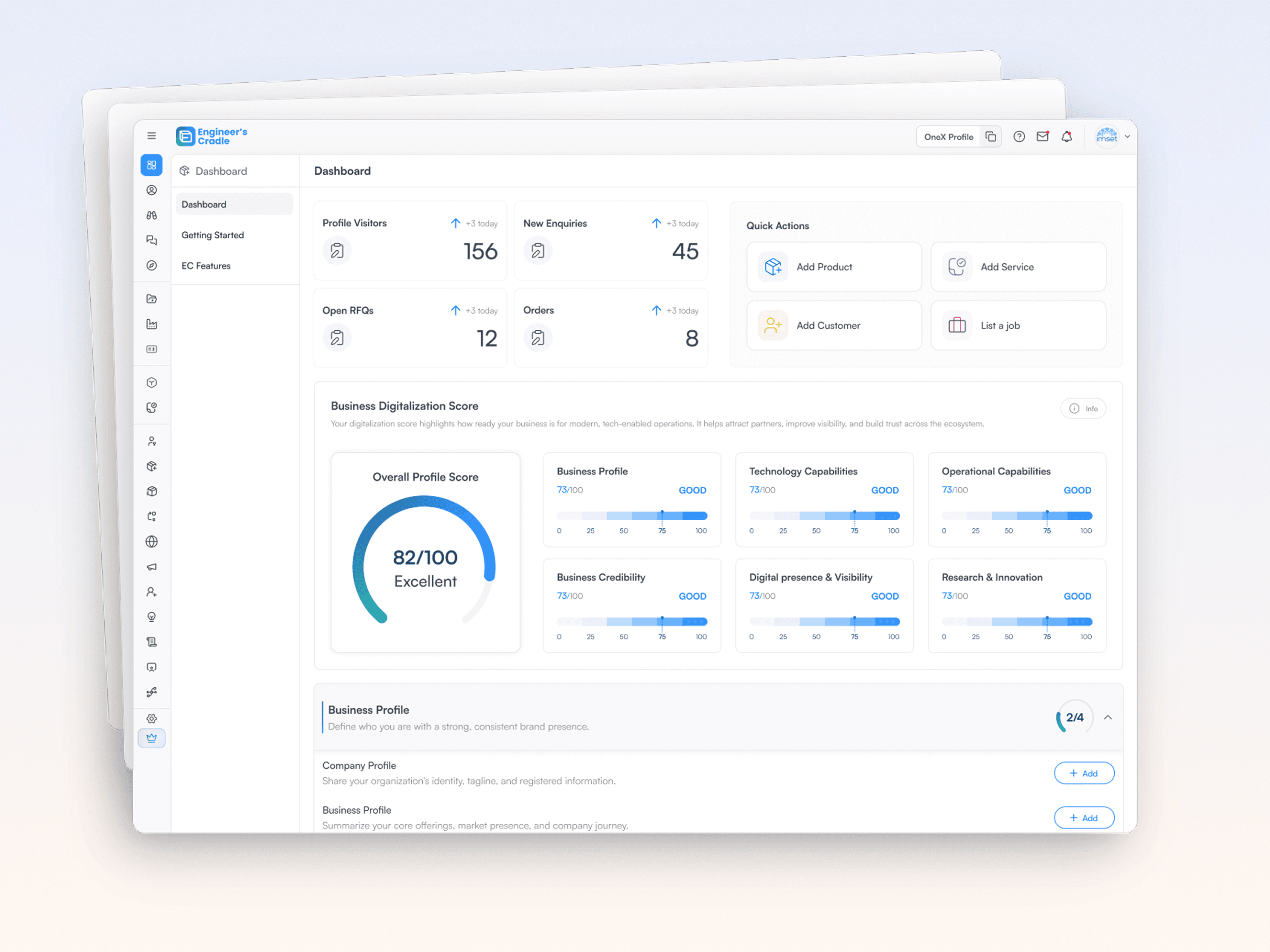
Coming Soon!
03 |EC OneX – Designing a Digital Growth OS for MSMEs
EC OneX is a B2B industrial platform and "Digital Growth OS" designed to help MSMEs (Micro, Small & Medium Enterprises), manufacturers, and industry associations build their digital identity, capture leads, and manage their business growth in one place
Complex Workflow Design
B2B SaaS
Information Architecture
01 | HospitalityFlow - AI Hospitality Management
Designed dashboard interface and landing page for an AI-powered platform that helps hotel teams automate review responses and track guest sentiment across properties.
UI Design
SaaS Redesign
02 | Reclaiming the Screen: How We Fixed Our Navigation
Eliminating navigational clutter to give users their workspace back. Reduced vertical scrolling by 80% to ensure critical triggers are always accessible on the first fold.
B2B SaaS
Interaction Design
Enterprise UX